Showing posts with label SEO TIPS. Show all posts

Another Basic Search Engine Optimization (SEO)

Posted by roinah on Wednesday, January 4, 2012

Introduction

The goal of SEO is to increase your site’s position in search engine response lists when people type key phrases into search engines

You want to make your site more appealing to search engines so that they will give you more traffic when people search for what your website has to offer.

Traffic that occurs when people click on a search engine response listing for your site is called organic (free) traffic

Target keyphrase Research

Search engines do two things

First, they categorize sites
Second, they rank them by relevance within a category

You need to

Help search engines understand your categories
Convince them to rank you highly within a category

Search engines use key phrases to do this.

Key phrases are words or phrases that characterize your site
Money
Make Money at Home

Target Key phrases

You need to identify good key phrases to characterize your site’s webpages
You need to anticipate what key phrases searchers will use
In jargon, you need to select target key phrases

Many key phrases are highly competitive

“Make money”
Do not try to fight these by selecting them as your key phrases
Established sites will almost always win
This makes sense because they have more traffic
In addition, they have more SEO expertise than you will
Your ranking will be so low on the response list that nobody will find you

Choose a less competitive target key phrase

More specific
“Make money on eBay”
“Make money with a good eBay strategy”
Concept
Bad: Fewer searches will point to you
Good: But they will point to you with a higher ranking
The idea is that enough searches will give results pages that rank you highly to bring in sufficient business
Finding key phrases that do this requires a great deal of thought

Select multiple key phrases

Use synonyms

Search engines like synonyms rather than mindless repetition
Search engines call this latent semantic indexing
“Six pack abs” “flat tummy,” “tone your midsection” etc.
Write naturally: Key phrases should only be 2% to 5% of your content
You will be rewarded for this

On-Site Actions

Things that you can build into your site
Search engines pay more attention to certain parts of your site than to others

Domain Name

Should include your key phrase

Don’t Put key phrases in images

Search engines can’t read them

Focus Each Page on a Specific Key phrase

Content should include it
2% to 5% of time use the key phrase or synonyms

Title

<title>xxxxxx</title>
Quite important in SEO. Put your key phrase here

Meta Tag: Keywords

<metaname=”keywords” content=”make money, make money online, how to make money online”>
3-10 keywords/key phrases
Use these on the page

Meta Tag: Description

<metaname=”description” content=”This site………”>
Search engines may use this as the descriptor under your link in the results page.

Anchor Text

<a href=”xxx”>This is anchor text</a>
Search engines consider this significantly
Use key phrases
Internal links within sites are good
External links from other sites are good

<h1>, <h2>, <h3>, <h4>, <h5>, <h6>

Usually, one h1 on a page
Multiple h2s
Search engines consider these, especially h1s and h2s

Body Copy

Use your key phrases
Use synonyms
But write naturally

Frequently Update Your site

Search engines like this
XML compliant site map

Read More

Module : Managing Page Metadata With Kentico CMS Meta Data

Posted by roinah on Monday, December 26, 2011

What is Search Engine Optimization?

Metadata is used to describe other data. It provides information about the content that it describes. For example a text document may contain information about how long the document is or who authored it. Web pages contain metadata that is used to describe the content using meta-keywords. This data is used by search engines like Google as a way to organize, collect and display information for users searching for content.

Allowing users to find your pages on the web is a critical success factor of any web site. One of the main activities of Search Engine Optimization (SEO) is optimizing web site content, meta-keywords, and page titles, that all factor into what is called page rank.

This ultimately determines your “organic” listing order when a person searches using Google, Yahoo! Search, Live Search, Bing or other service. Within Kentico CMS you will want to spent time to sharpen content so it is rich in search terms, add a very descriptive page title and meta-keywords.

Meta Keywords are HTML elements that are used to provide structured information about a web page. These elements are placed in the HEAD section of a page where search engines read it. Kentico CMS simplifies a lot of these SEO optimization tasks, as we will see in our lab.


Kentico CMS Meta Data


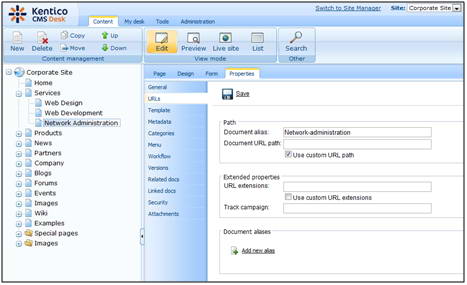
Kentico CMS allows you to modify web page meta-data to enhance the web page visibility to search engines. The figure below shows where meta-data can be added to an existing web page, in the case of this example, the Network Administration page.

 This is important: Unless told by your System Administrator make sure that you select the Inherit check box. This ensures page data is available from all parent pages.


Page Address (URL)


We can also make changes to the address (URL) of the page. This can be performed on the Properties -> URLs tab of each document. You need to get familiar with the following terms before setting up page URLs:

Alias path – path to the document within the content tree; this path is created by the Document aliases of the page and all its parent pages, e.g. /Home or /Services/Network-administration.aspx

Document alias – unique name of the document; this name is the same for all language versions of the document and doesn’t change when the Page name is modified

Document URL path –used to “override” the Document alias; each language version can have its own URL path, which can be used for SEO optimization on multilingual sites; it can also be used to set a short path for pages deep inside the tree hierarchy (e.g. /About instead of /Special-pages/About)

Document aliases – this section allows adding of other additional document aliases, which may be needed in some special cases not covered by this lesson

URL extensions – used to define other extensions under which the document can be accessed (besides the default ones set in Site Manager -> Settings -> URLs and SEO -> Friendly URLs extensions and Files friendly URLs extensions); typically used to allow access to files under their original extension (e.g. …/document.pdf instead of …/document.aspx)


As shown below, you can see where URLs can be modified.

Lab 1 - Changing URLs


We will continue with the multilingual site in English and Spanish from Lesson 10 (or your trainer may have set up a different site for this purpose). What we want to do is use the Document URL path to add a localized URL to the Spanish version of the News page.

To do this, select Spanish from the Language bar, then select News in the Content Tree and click Properties -> URLs. Enable the Use custom URL path option, enter Noticias into the Document URL path field and click Save.


 This is important: In our previous module we applied workflow to the News folder. If this workflow is still active you may need to approve the document before it shows on the live site.


Now let’s verify in our browser that the entered URL works correctly. Sign out of CMS Desk, make sure you are in the Spanish version of the live site and enter <your domain>/Noticias.aspx into your browser’s address line. You should get navigated to the Spanish version of the News page.


Now let’s presume that we want to add another document alias, this time it will be /Nueva.

So, we will log back into CMS Desk, select the News document in the Spanish version again and switch to the Properties -> URLs tab. This time, click the Add new alias link in the Document aliases section at the bottom.


In the following dialog, enter /Nueva into the URL path field and confirm by clicking OK.


Back on the URLs tab, you can see the new additional alias listed at the bottom of the page.

Now if you log out of CMS Desk and try to access <your domain>/Nueva.aspx in the Spanish version, you should also get redirected to the News page.


These are our Document aliases finished. Another important part of our SEO optimization will be the meta-data. For the purpose of this lesson, we will add some meta-data to the Network Administration page.

To change the page meta-data for our Network Administration page, we go back to our Content Tree, select Services -> Network Administration and choose Properties from the menu. Now click on Metadata in the left menu. 

We want to use the following meta-data (in a real-world scenario, you may use an SEO consultant to help you write the search engine optimized content):

·         Page title: Administration Services

·         Page Description: This page is a list of our Network Administration Services

·         Page Keywords: Network Administration, Network Admin, Networking

To do this, uncheck the Inherit check-box and add the listed values to the respective text boxes. Finally click Save to save the changes. 

Now we can go see the changes. Sign out and go to the Services -> Network Administration page. You will see that the browser window title is Administration Services now. The description and keywords are stored in the page HTML code and they are not visible to users, but they can be read by Google and other search engines.

Then, to see the keyword changes, right click on the page and select View Source. You will see the following,
<!DOCTYPE html PUBLIC "-//W3C//DTD XHTML 1.0 Transitional//EN" "http://www.w3.org/TR/xhtml1/DTD/xhtml1-transitional.dtd">
<html xmlns="http://www.w3.org/1999/xhtml">
<head id="Head1"><title>
Corporate Site - Administration Services
</title><meta name="description" content="This page is a list of our Network Administration Services" />
<meta http-equiv="content-type" content="text/html; charset=UTF-8" />
<meta http-equiv="pragma" content="no-cache" />
<meta http-equiv="content-style-type" content="text/css" />
<meta http-equiv="content-script-type" content="text/javascript" />
<meta name="keywords" content="Network Administration, Network Admin, Networking" />
 
Notice the <title> and <meta> description and keywords reflect the changes we made in Kentico CMS.
Read More

Researching Keywords

Posted by roinah on Saturday, December 10, 2011


Obvious Keywords
The process of researching keywords is still a bit difficult. Although there are tools you can use to help the process, it’s still sometimes a bit more art than science. The best place to start is with those keywords and phrases that are obvious to you. Starting with a list of such words will make the rest of the process easier, so begin by listing the most obvious keywords that describe your site, your products, the type of information you
have to offer, etc.

Related Terms

The next important group of keywords is the set of related terms that are used to describe things similar to whatever your site is about. My own site, Inside Out Marketing, is about internet marketing, a subject that is closely related to web site development, search engine positioning, etc. In many cases these related terms will be in your main list, but if they’re not, start making a list.

These related terms will become more important to you later on, as you work to expand your site's theme and traffic. For example, a site with a strong theme of “website promotion” will often be linked to sites with the strong theme of “search engine positioning.” It would be logical, when expanding the site, to add content around these new terms.

You’ll also use these terms later as you work to strengthen your site’s “off the page”factors like link popularity and link relevance. Related sites that aren't direct competitors are great candidates for partnerships, such as content sharing and link swaps.

Keyword Tools: Overture.com

Fortunately, you’re not alone in your need to research keywords. As a result, there are a number of quality tools on the market to help you with this effort. The first, and in many ways best, is the “Term Suggestion Tool" at Overture. Overture is a “pay-per-click” search engine, and their customers want to know which keywords and phrases are searched most often.
Overture is happy to oblige, since higher demand for popular keywords leads to greater revenue for the search engine. You can find this free tool at http://inventory.overture.com/d/searchinventory/suggestion – although it has moved a couple times. If you are a Overture bidder already, you can always find it by logging in to your account.
To use the Overture tool, type in a primary keyword to see how many searches were conducted in the past month for that term. You’ll see how many searches were done for that particular keyword phrase, along with a list of related terms. Add as many of these related terms to your list as you feel is appropriate.

For every keyword in your list, try to get a count from Overture. This will help you set priorities later on. When you get ready to create a theme-based site, you may discover that the job is a little too big to take on all at once. It’s often easier to start with a single category or major keyword, and build a theme around that. Why not start with the keyword that gets the most targeted traffic?

Keyword Tools: Google Adwords

One of the most innovative new services is Google's Adwords program. This allows you to purchase a small text ad, targeted for specific keywords, and pay for it on a per-impression basis. I can't recommend it as a great way to advertise, but they do offer a very nice tool for doing keyword research.
Go to https://adwords.google.com/select/main?cmd=KeywordSandbox for Google's keyword suggestion tool.

Keyword Tools: Wordtracker

The next tool in the arsenal is not free, but it’s reasonably priced, particularly if you’re operating a for-profit website. The Wordtracker service (http://www.wordtracker.com) will help you build a large list of keywords, and tracks the number of searches for each keyword. Wordtracker is due for an upgrade, which should be coming in early 2004 at the latest.

Keyword Tools: SEO Research Labs

My own SEO Research Labs (http://www.seoresearchlabs.com) provides keyword research reports for $99.95 each, with a turnaround time of about a week. We'll use a variety of tools, including Wordtracker, to prepare your report. This service was created to help readers get a jump start on their search engine strategy. If keyword research isn't your bag, why not give us a try?

Prioritizing & Targeting Keywords

Now that you’ve got a good list of keywords, phrases, qualifiers, etc. it’s time to set some priorities. If you’ve done your research well, you should have little trouble. High traffic comes from a lot of searches, so your top priority should be those keywords or phrases that show the greatest number of searches per month. Cover your bases by making sure that for all of your top-priority keywords and phrases, you also list out the
various qualifiers that can add to the list.
Before you instantly jump on the most popular keywords, take a moment to consider how closely each will target your desired audience. A search term that gets 10,000 searches a month might look great at first, but is it really a good fit? If only 10% of those using it are actually looking for what you offer, the effective value is really only 1,000 searches a month.

I recommend that you decide on 5-10 top priority keywords/phrases at most, which will become the primary keywords used in your site. Your overall theme could be summarized in one keyword/phrase, and the rest will be closely related keywords.

Additional keyword phrases in your site will be variations of these top keywords (using qualifiers, etc.). If you can’t encapsulate your theme within this number of keywords, pick the most important keywords/phrases to start with.

Assessing Your Keyword Strategy

If you don’t have any kind of website traffic analysis software or service on your site now, see Chapter 9 for a listing of the different software packages and online services. It’s absolutely vital that you track where your visitors are coming from, and what keywords they use to find you.
Once you’ve got your site positioned, give it three months before taking stock of your keyword strategy. Of course, your primary goal is to increase traffic, and within three months you should begin to see results. Almost as important as total traffic is the number of keywords or phrases that visitors have used to find your site.
The most successful sites will show referrals from hundreds of different keyword phrases. This is the result of your primary keywords combining with different qualifiers.As you add optimized content to your website, the number of searches where your site can appear will increase.

I wish you all the success you can imagine. I hope that your keyword strategy takes
you even further, to thousands of search phrases delivering traffic to your site.
Read More

Measuring & Identifying SEO Opportunity Webinar

Posted by roinah on Friday, December 9, 2011

The list below includes answers to questions we did not have an opportunity to cover during the Q&A session of this webinar. To review all questions discussed, please visit the archived webinar recording on Producers Exchange.


1) Where can I find the SEO Checklist? 
The SEO checklist is available on Producers Exchange at:http://bit.ly/euQzMT

2) Are "tags "in WordPress beneficial to SEO?

The way tags are set up by default in blogging software and the way most publishers tend to use them tend not to be that helpful for SEO. Often, publishers will create too many different tags that just repeat what's already in the article; each tag generates a new "tag" page but very few of those tag pages are strong enough by themselves to rank for their keyword. Generating a lot of pages that are light on "unique" content and that have no shot at ranking is generally a bad SEO tactic, so by default Wordpress puts a robots noindex directive on those pages anyway.

If you can accomplish your objective using Wordpress "categories" instead of "tags", that tends to help curb the tendency to create new pages that only contain one or two stories.

If you do want to try to get your tag pages to rank instead of your category pages (or your articles themselves), then there are a couple things you need to do: 1) Map your tags against your keyword strategy: limit yourself to a finite set of tags that you can rank for, rather than generating completely new tags for every post. If you do need a new tag, try to establish some rule of thumb where you don't use a tag unless the resulting tag page has at least 6-8 number of stories on it and the tag is a descriptive keyword people would actually use to search. 2) Once you've cleaned up all your tags and you're certain you don't have a duplicate content problem and you're not undermining the ranking potential of the actual articles, then you can remove "nofollow" from your meta robots tag.

In short: having more pages doesn't necessarily mean better rankings. It's better to have fewer but stronger pages than to create a tag schema that dilutes your site's PageRank across a lot of weak pages.


3) Do you have suggestions for determining keywords for a news site, where the content is constantly changing? For example: we have a lot of coverage of the war in Libya, but we are getting very little search traffic for that...is it worth to invest in that short-term keyword? Or should we be focusing on just a few long-term keywords?

News sites need a two-fold keyword approach: Targeting keywords for short-term news cycle traffic and then positioning themselves for long-term rankings.

For breaking news terms, the Google AdWords tool is not going to work well. Instead, you'll want to use something like the Google Trends tool to see what keyword version people are searching for. Quite a bit of that behavior is going to be determined by what phrases/headlines other news outlets are using.

Try Google Trends: http://www.google.com/trends?q=japan+tsunami%2C+japan+earthquake&ctab=0&geo=us&geor=all&date=mtd&sort=0

For breaking news, your objective is really to try to get into the Google News One-Box (where Google News results are pulled directly onto the top of the main results pages). Getting to the top of Google News can send a huge spike in traffic, but that dries up as fast as it came, so you can't rest your entire strategy on it.

That's why the short-term "chasing the news cycle" tactic should be part of a larger strategy of making sure your content is well positioned to keep drawing in traffic longer term.

Other than trying to get into Google News, the strategy for picking keywords isn't all that different than what I outlined in the blog posts: prioritize keywords to target based on the potential they have to drive traffic AND your site's ability to rank for those terms. That may mean targeting phrases deeper in the long tail, but where you can maintain rankings.

And keep in mind that picking the right keyword phrases to target is just one part of the optimization process.


4) Does Merlin Meta Data play a role in SEO? 
Yes!
For Producers and Stations who ingest their content into Merlin (for PBS.org), there is extra incentive to fill in your meta data fields because it can boost your SEO performance. Visit the link below for more details.

http://projects.pbs.org/confluence/pages/viewpage.action?pageId=22184199


5) What SEO Blogs do you recommend?

SEO Blogs and Resources – Melanie's recommended reading list

Google Webmaster Central: YouTube Channel - http://www.youtube.com/user/GoogleWebmasterHelp
Not a blog, but lots of basic SEO tips and Q&A from Google's anti-spam chief. If you have a question about SEO, odds are good that Matt's done a video about it.

The Official Google Blog - http://googleblog.blogspot.com/
News and updates about Google products and what they mean to users.

SEO Book - http://www.seobook.com/blog
Thought-leadership by Aaron Wall and other advanced SEOs.

Search Engine Watch - http://searchenginewatch.com/
Industry news and specific how-to's on a range of online marketing topics.

Search Engine Land - http://searchengineland.com/
Industry news, thoughts and how-to's related to search marketing.

Outspoken Media - http://outspokenmedia.com/blog/
Lots of great online marketing ideas presented in a fresh voice.
Read More

What is search engine optimization?

Posted by roinah on Monday, December 5, 2011

SEO, or "Search Engine Optimization / Search Engine Positioning" is the process of Creating Keywords and Keyword Phrases for each page, making it possible for search engine “spiders” to find your sight for potential client searches.

Search engines have different criterion to measure web page importance. Search engine optimization (SEO) is the process of increasing the importance of a web page with the goal of getting the page positioned at the top of the search results.

How long will it take for my web site to get to the top of the search engines?
Most often SEO is a long term process. Getting a new site indexed in the major search engines could take several days to a few months. But getting good positioning in the search engine is a longer process and can take up to a year or longer. There is no way to determine how long it will take to achieve desired positioning. Patience is the key to search engine optimization.

How much traffic will my web site gain from SEO?
The traffic you get will depend on what keyword phrases you optimize your web pages for and what positioning your site achieves. If you optimize for less competitive keyword phrases you may gain a top position but receive very little traffic. Optimizing for competitive keyword phrases and achieving a top position will increase your traffic. However, if you are optimized for the wrong keyword phrases you could achieve higher traffic that results in low conversions.

What will you do to optimize my web site?
Current SEO trends include: back linking, html and title tags, content copy, anchor link text and keyword analysis. Depending on your situation all or a few of these methods will be used.

How often will you submit my site to the search engines?
One Time, then we rely on proper back linking major search engines like Google, Yahoo, MSN and Ask Jeeves will crawl and index your site naturally. Most of the smaller search engines pull their information from the major search engines and directories such as Google, Yahoo and DMOZ, so there is no need to submit to the smaller search engines. Time is better spent back linking to relevant web sites and submitting to relevant directories.

How much does SEO cost?
SEO services range from several hundred dollars to thousands. Some web site owners spend over $10,000 per year on search engine optimization. Many SEOs will custom a SEO package to fit your budget.

What is backlinking?
Backlinking, or link campaign, is one of the most important aspects of the SEO process. Back linking involves getting other relevant web sites to create links to your web site. The text used in your back links is also very important. It should contain your most desirable keyword phrases. Many web sites have very high positioning in Google without meeting any other SEO criterion except for back links.

Will backlinking increase my engine position?
Yes, Google is now placing enormous amounts of weight to how many back links you have to your site. Remember it is very important to have relevant links on your site as well this would be reciprocal linking where another website has a link to your page and you have a link to their page on your site.

Is there a guarantee?
Our guarantee is that your web site will be optimized by current SEO trends and requirements and that your positioning will improve. We do not guarantee a particular position in any search engine, nor do we guarantee any particular amount of traffic or sales improvements.

Why do I need search engine optimization?
SEO is essential to increasing your web presence. SEO takes research and patience, and if you are running an e-commerce web site without SEO then you are missing out on one of your greatest Internet traffic resources. SEO can make the difference between success or failure of an e-commerce venture.
Why does search engine optimization take so long?
As search engine optimizers, we are sometimes competing with millions of web pages for positioning of a single web page. Many of these web pages are highly optimized due to being several years old and having thousands of back links, therefore, establishing a web presence among these highly optimized web pages is often a long term project requiring considerable effort.

The Most Popular Search Engines
Over the past few years competition between the major search engines Google, Yahoo and MSN has resulted in improved search engine user experiences. And with Internet users expectations always growing higher, these search engine companies are forced to continuously improve upon their search engine features and technologies. As a web site owner you should understand that optimizing your web site doesn't guarantee positioning in any search engine, but by reading through the next few paragraphs you will gain an understanding of the traffic potential search engine optimization could give your web site.

Google Search Engine
Of the major search engines Google is currently the most popular for searching the web. Part of this is because of Google's continuous strive to provide the most relevant information to searchers. But Google's efforts to be the top search engine doesn't stop at web site listings. Google offers numerous features such as image search, news search, dictionary definitions, street maps, telephone numbers and spell checking. And because Google has so many users it is capable of generating very high volumes of traffic. And it is because of this high traffic that most webmasters strive to get their web sites listed in Google. In a 2005 Nielsen NetRatings study of over one million Internet users, over 47.3% of searches were conducted at Google.

Yahoo Search Engine
Yahoo started out in 1994 as a directory. A directory is a search web site that has humans organizing the information into categories rather than search engine crawlers. A few years ago Yahoo switched over to the search engine crawler listings but pulled their information from Google. More recently, Yahoo has dropped Google as their search listing provider and has adopted their own crawler technology. Yahoo has been and still is one of the most popular search engines because, like Google, Yahoo offers their own unique services such as their own pay per click program, Yahoo Shopping directory, email and many different variations on search features. In the 2005 Nielsen NetRatings study 20.9% of the searches were conducted at Yahoo.

MSN Search Engine
MSN Search is still one of the leading search engines but lately has fallen behind Google and Yahoo in terms of available search features, but because of it's prior popularity many Internet users still conduct searches on the search engine. Currently MSN is attempting a comeback, and although it has a long way to catch up with Google and Yahoo, it will remain a major search engine that is capable of generating traffic. In the 2005 Nielsen NetRatings study 13.6% of the searches were conducted at MSN Search.

The Bottom Line
Google, Yahoo, and MSN were used in 80% of the searches conducted by the Internet users in this study. Other search engines such as Netscape, My Way, AOL, Ask Jeeves, iWon and Earthlink were responsible for the other 20% of searches.
Read More

Ten commandments of Search Engine Optimization

Posted by roinah


Commandment 1: There are No Rank Guarantees. (Period)
Search Engines alone control their indexing and ranking algorithm. Do not try to trick Search Engines. The only way to improve your search engine rank is by playing by the rules. And the rule is very simple: make it logical. Web content is primArialy for the site visitor and not crawlers.
If your Search Engine Optimizer sold you magic "Top rank on Google in 10 days flat". Forget it. There are no short cuts. Top ranking in Search Engine Natural Results will take time. Hard work is imperative especially in developing the content on your website and the links to your site.

Commandment 2: Ranking is Not the End, It's the Means.
Ask yourself what will a top search engine rank get you? Most businesses are interested in increasing sales on a website or at the least driving qualified traffic. Ranking for the right keywords (keywords used by your target audience) is important. There are SEOs who will try to show case results for keywords that occur only on your website. Beware such gimmicks.

Commandment 3: Know Your Competition.
"Rank" is relative position and more so in the Search Engines' natural results. How well you do in the search engine results is a function of how much hard work you have done in relation to your competition. Analyze your competition's keywords, links, keyword density and spread, but be sure not to copy your competition.

Commandment 4: Use Search Engine Friendly Design.
A search and visitor friendly design is a must for any successful website. Your website should be compelling enough for repeat visits by search engines and potential customers. Make sure you have search engine friendly URLs and avoid those long URLs with query strings.

Commandment 5: Select Keywords that are Worthy.
You must research your keywords before targeting. There are tools that give you a good idea of a keyword's search potential for example. It is important to know the number of searches for a keyword in the last month, last 6 months and last year. You should also find out the number of web pages that are targeting the keyword. It is advisable to start a campaign with keywords with moderate competition and a high number of searches.

Commandment 6: Write Great Content.
Even if your website site is technically perfect for search engine robots, it won't do you any good unless you also fill it with great content. Great means it has contextual and editorial value. Great content brings repeat visits and increases the chance of conversion. Great content is factual and appeals to your target audience. Your web page should have your desired action embedded in the content and you must ensure that the content is fresh. Keep adding and editing content regularly.

Commandment 7: Use Good Hyper Linking Strategy.
Hyperlinks make your content accessible and contextual. You must hyperlink in the right context within the website and to other websites. Good links are appreciated by the Search Engines and by visitors. No one likes to be taken to a mall selling "Macintosh" when shopping for "apples".

Commandment 8: Write Relevant and Original Meta Content.
Meta content is like a business card. Just as your business card tells who you are and what you do, Meta content tells the search engines the relevance and context of a web page. Resist the temptation to include everything in the Meta content, but make it detailed. Confused? The idea is to include only what is relevant to the page in the Meta Content but to include everything that is relevant.

Commandment 9: Acquire Relevant Links.
The links you acquire are the roads to your web page for search engine bots and visitors. Good links improve your webpage's equity on the World Wide Web and bad links make a dent in your equity and credibility. Be selective in reciprocal linking. Both reciprocal and one way links work, if you are prudent in selecting the links. Submit your website to the relevant sections in relevant directories.

Commandment 10: Consult Experts, If You Need To.
If you have the competence, there are two ways to learn - learning from your mistakes and learning from others' experience. You can choose either. If you have the time and can wait for the online dollars, do it yourself. If you want to get started now, it may be useful to consult the experts.
Read More

The SEO Keyword Research Series

Posted by roinah on Friday, December 2, 2011

Part One

So, what are keywords? - Keywords are the words (or phrases) that someone types into a search engine in order to find results about a particular niche. However, different keywords bring up different results. Additionally, the number of people using a keyword differs making certain keywords more valuable than others. For this reason, understanding keywords and the way in which they can alter the success of your website is vital. Choosing the right keywords is essential to ensure you gain the right targeted traffic to your site.

In this series of articles I will be exploring what you need to consider when picking the right keywords for your site to ensure your site receives the traffic it needs and you enjoy the success you deserve.
The line between success and failure online is a thin one. Success can lead to a comfortable and varied lifestyle, but failure can lead to months of wasted effort, money and ultimately disappointment. I have seen people succeed in marketing themselves, their companies or their products online. Although I have seen more people fail.

I have found that the fate of a website depends on two key areas – The market they choose and the keywords they target.
More often than not, people enter a market and fail to do the market research that is necessary to check whether the idea they have for their business is completely viable or not. I have found that the people who fail will follow a pattern. They simply rush in and pick a random market to target. Then, they pick random keywords (or sometimes no keywords at all!!) and then cross their extremities and hope that it all works out. Sadly, it largely doesn’t and the majority of these sites fail.
On the other hand, the sites that succeed will do things very differently. They will research their market very carefully and identify the areas of a market that are the most profitable. Their keywords will be specific and targeted to the market they researched. Finally, they will follow a tried and tested plan.
I want to see more people in the second group and enjoy a fruitful online career. In order for you to be a success online I have produced a selection of articles that will guide you step-by-step through the process and key elements you need to consider when picking those all important keywords. This will get you well on your way to success with your website.


Part Two:
The ‘Key’ Elements of Keyword Research

Welcome to Part Two of the SEO Keyword Research Series. We will be looking at the key elements of the Keyword Research process and the important areas for you to consider ensuring that you pick the right keywords for your website. This will give you the targeted traffic for your business to succeed.

‘What is Keyword research?’ - The easiest way to understand this is to think of the process as similar to panning for gold in the rivers during the great gold rush. When doing this you would take a pan, you would filter the larger rocks out and you would look to sift the heavier gold from the dirt, sand and rocks that remain in the pan. Hopefully they would be left with a few nuggets of gold at the bottom. This is what you need to do with Keyword Research, only your golden nuggets are the keywords to use on your website.

‘What are the Characteristics of a Keyword’ – Well, your ‘golden nuggets’ have four key elements that need to be considered whenever you are choosing a keyword that is best suited to targeting your online business. These are:

  • Relevant – The keyword you have must be highly relevant to your business, your products or market place you are promoting.
  • Competition – It must have a level of competition that is acceptable.
  • Commercial – The keyword must be commercially appealing. I.e. It must be profitable.
  • Traffic – Perhaps the most obviously of the four - The Keyword must generate traffic!!!

If you fail to look at these four key elements when considering which keywords are right for your business you run the risk of missing out on the right traffic that could produce a healthy income.

In parts three to six we will now look at these characteristics in more detail so that you understand them in their entirety.

Part Three :
Relevant Keywords

In Part two of the SEO Keyword Research Series we looked at the four ‘Key’ elements that you need to consider each and every time you pick a keyword for your business. This is to ensure that you are driving the right traffic to your site, providing you with the sales and income you want (nah, deserve!!). These four elements were Relevant, Competition, Commercial and Traffic. We will be looking at the first of these in more detail – ‘Relevant Keywords’.

More often than not, people will over look the need to ensure that their keywords are relevant. They will often choose random keywords and hope that it brings in the numbers. These may even prove successful to a degree, often providing high levels of traffic or a high ranking in the Google keyword search. This high level of traffic is useless if it does not produce sales. No sales. No income. This is all because the people coming to your site are not interested in your content.

The secret is not just ‘traffic’. It is ‘Targeted Traffic’!!!

To avoid this, the content on your website needs to be directly relevant to the keywords that you are targeting. So, you can do one of two things. Change the content. Although this seems like a laborious option. Alternatively, you could change the keywords you are using.

To ensure you are using relevant keywords you need to consider the following:
  • See what sites come up when you are entering in your keywords into a search engine. For example, Google.
  • Ask yourself – Bearing in mind your key search words would you find this site useful?
  • Remove irrelevant keywords from any phrases that you are using.
  • Think of the order of the words you are using – What order would a searcher put these into a search engine in?
  • Think of some positive phrases that you can use. Focus on different lay outs of words in these phrases that are directly relevant to your niche or market. For example, ‘dog train’ and ‘train dogs’ will come up with completely different replies from a search engine.
By using these techniques, along with the other 3 ‘key’ elements, you are able to pan through the keywords and obtain a more definitive set of words that are highly relevant to your product, business or market place. Ensuring that the traffic you get is accurate, relevant and targeted to provide you with the sales you need.#

Part Four:
‘Evaluating the Competition’

In Part three of the SEO Keyword Research Series we looked at ‘Relevant Keywords’. To ensure that you are driving the right traffic to your site, providing you with the sales and income you want. This time around we are looking at the second of the important ‘Key ‘elements. This is ‘Evaluating the competition’.

It goes without saying that one of the easiest ways to get a steady source of traffic is to get your website onto page one of the Google Keyword Search. The issue here is this is prime online real estate. There are only ten spots on the front page and far more than this competing for these positions.

There are two important things to consider when thinking about competition. These are:
• The amount of competition – Put simply, the number of websites competing for the page one ranking using a particular keyword or phrase. This varies considerably depending on the keyword or phrase used. Some have high competition i.e. lots of websites targeting a keyword. Others have low competition i.e. few websites targeting a keyword.
• The strength of the competition – Some websites are highly optimised. They have been around for a long time and therefore have a large number of back links into their site. Others are relatively new and only have a few back links to them. Both of these websites may still obtain a page one ranking on a Google keyword search depending on the keyword or phrase they target. I.e. they both target different keywords.

Clearly, you would want your keyword or phrase to put your business up against others in an area with very few weak, competitors. This is obviously better than using a keyword or phrase that puts you up against many, strong competitors.

Remember, in part one I said that one of the key areas for people failing in online businesses is because they fail to do their market research. This is especially relevant to their ‘Competition’. The company will start to produce content for their site. They will fail to evaluate the competition. The competition is too strong. They never reach a good ranking with the search engines and fail to get the traffic they require.

This is sad as some of these businesses have worked extremely hard to build an often very good website.

For this reason, it is imperative that a business picks it battles wisely and only chooses keywords or phrases that give it a good chance of obtaining a front page ranking. This will lead to a healthy flow of traffic, hopefully a good return on sales and healthy bottom line.


Part Five :
'Is this Keyword Commercially Viable?'

In Part four of the SEO Keyword Research Series we looked at ‘Evaluating the competition’. To recap, to ensure that you are getting the right traffic you need to find relevant keywords and evaluate the competition. This will ensure you are well on your way to driving the right traffic to your site and providing you with the sales and income you want. The third of the important ‘Key ‘elements is considering the commercial aspects of a keyword. More specifically, asking the question 'Is this Keyword Commercially Viable?'

So what is meant by the term commercially viable? Well, we are looking at the financial concerns of a keyword or phrase here. Basically, a keyword is commercially viable if it brings with it a strong flow of money, sales or profits to your business. A keyword is not commercially viable if it only generates a small amount of sales.

Here is why you need to consider this when choosing which keyword or phrase to target. Imagine you have just chosen some keywords that fit all of the ‘key’ elements. You optimise your website with your new keyword or phrase and (low and behold!!) you manage to obtain a page one ranking on the Google Keyword Search. Your site gets tonnes of traffic and everything seems to be heading in the right direction. The only thing is...you are not making any sales!! No one is buying anything!! The reason is you have accidently targeted a phrase or keyword that is not commercially viable.

For this reason, it is imperative that you check whether your keyword or phrase will be profitable. In order to check this we need to look at Google Adwords and Cost Per Click (CPC).

You will have noticed on the right hand side of the Google search page there is a list of advertisements. These are placed by advertisers in order to create leads into their businesses website. Each time someone ‘clicks’ on the advertisement the advertiser pays Google an agreed amount of money – hence the term ‘Cost Per Click’!!

As there are lots of advertisers wanting to use this service it turns into a type of bidding war - similar to the stock market. Over time, the market will decide what the cost of each keyword is depending on how popular it is in both search engines and with the advertisers. The figure ($) given provides us with an indication of how commercially viable this keyword is.

Therefore, to help you decide whether your keyword is commercially viable you need to check the Google Adwords and search for your keywords or phrases. The more expensive the CPC value the better the keyword or phrase.

This is not a quick process and it is not full-proof although it does give you a guide to work from. Admittedly, you can also buy software that will do this process for you although when you are starting out this is something you may not be inclined to do. Believe me, the time you spend doing this will save you time, effort and money later down the line. Just compare what you would lose if your site was profitable compared to it not.


Part Six: 
‘The ‘Key’ Word is Traffic?'

Few people fully realise the difference between finishing first and seventh on the first page of Google. The majority of people will choose to pick the number one ranked site. Less people will choose to pick the other websites on that page. The breakdown is as follows:

• Number 1 – 42%
• Number 2 – 12%
• Number 3 – 8%
• Number 4 – 6%
• Number 5 – 5%
• Number 6 – 4%
• Number 7 – 3%

So, how do you measure the amount of potential traffic you will receive from a keyword? This is relatively easy to do through Google Adwords. Here you can add the keyword or phrase and then hit search. This will show you how many searches are completed on a particular keyword or phrase OR derivatives of those keywords. You can then change the search criteria depending on the geographical requirements or competition levels. You could then work out how many hits a keyword could produce if you were number one on the search results page.

For example, say you were selling camping stoves. Globally there are 18,100 monthly searches for ‘camping stoves’. If you were number one on the search for this you would receive 42% of that number. This is over 7600 hits. If you were fourth you would get 4% of the traffic which equates to approximately 724 hits. This is a massive change of 1049%.

Alternatively, there are 49,500 global searches for ‘stoves camping’. These are the same two words in teh opposite order but could improve your traffic by over 273%.
You can see how using this tool could prove useful in assessing which keywords are ‘key’ to you generating targeted traffic. Additionally, there is software packages that you buy that will provide the information you require although it may be beneficial to manually do this initially.
I hope you can see that this, in conjunction with the other three ‘key’ elements, is essential for you get the ranking and success you require in your online business.
Thank you for reading and good luck.
Read More

SEO Step-by-Step Guide By Hensel

Posted by roinah

 SEO Step-by-Step Guide

1. Positioning
  1. Brainstorm keyword phrases
  2. Add keywords to https://adwords.google.com/select/KeywordToolExternal
  3. Google’s keyword selector shows keywords with total number of searches under column: “Local Monthly Searches”
  4. Find competing number of websites for every key phrase on Google.com. (Top Left corner)
  5. Decide how relevant that search term is. How many people who are searching for that search phrase are looking to buy your service/product?
  6. Add numbers to excel, use A-Z sorter.
  7. Success formula is High Number of Searches, Low number of competing websites, 100% relevancy. Choose 10-15 keywords that match those criteria.
  8. For each keyword, set a web page to optimize for that keyword

2. On Page Optimization (code)


What does Google understand from your website?
• What’s your platform?
• Speedtest
• W3C validation
• Robots.txt optimization
• RSS feeds (blog only)
• Google Sitemap creation

3. Textual Optimization

Keyword Use in:

1. Title Tag
2. First Word(s) of the Title Tag
3. Root Domain Name
4. H1 Headline Tag
5. Internal Link Anchor Text
6. External Link Anchor Text
7. First Word(s) in the H1 Tag
8. First 50-100 Words in HTML
9. Page Name URL
10. Page Folder URL
11. H2-H6 Headline Tags
12. Image ALT Tags
13. Repetitions in the HTML Text
14. Image Names

15. or Tags
16. Meta Description Tag

4. Link Building

1. Not every link is a good one
2. Prefer manual links over automatic links
3. Add your site to http://Google.com/webmaster
4. Check the Alexa ranking and Page Rank of a link
5. Check the code - is it going to help you?

Easiest ways to get links:
1. Internal links
2. Links from your other websites (is it beneficial?)
3. Link from your social media
4. Blog comments
5. StumpleUpon, Digg, Del.icio.us, other social bookmarking websites
6. Create great content that people want to link to
7. Directories of Chambers, trade organizations, etc
8. Be a guest blogger on a popular blog
9. Make your website Social Media friendly

5. Optimize for business

1. City/Geographic Location
2. Phone number
3. Call to Action + Form
4. Call to action/Sig under blog post and/or have banner/offer on the side
5. Make your site Social Media Friendly
6. Get your business listed with Google Maps


Branding Personality is ready to help you with Search Engine Optimization if you want to get results. Branding Personality offers consults, trainings and workshop next to packaged Search Engine Optimization services.

Find me online if you need any help!

:-)
Marieke Hensel
http://twitter.com/hensel
http://www.facebook.com/brandingpersonality
Email: support@brandingpersonality.com
Read More
Put My link in your blog than, click that lick from your blog, anda automaticly your link will appear in my web, thanks alot guys .... link :

BEst BacklinkUnique CultureTutorial 1945Facta 56UnvBacklinkBululawangEmak BacklinkDAnishaBacklinkEmak BacklinkDAnishBacklinkPlugboard ManiaAutomatic Backlink ExchangeText Back Links ExchangesUnlimited Backlink ExchangeFree BacklinksFree Automatic LinkFree BacklinksUnlimited Backlink ExchangeUnlimited Backlink ExchangeFree Automatic LinkFree BacklinksWeb Link ExchangeText Back Links ExchangesText Back Links ExchangeText Back Link ExchangeDAHOAM Free BacklinksIntercambio gratis de Enlaces